

Let's Talk
×
AI video generators can be considered one of the most useful tools for brands, creators, and marketers in 2025. Such tools help one produce quality videos without cameras, actors, and hours of editing. You can create ads, social media, and tutorial videos, as well as business presentations, with only a script or a few lines of text in minutes.
As videos on each platform grow quickly, businesses rely on AI to save time and money. They can produce videos in a shorter period and remain in line with their content, unlike spending days on production.
In this article, you can find the 15 best AI video generators of 2025, described by their features and prices, along with their actual performance. If you are looking to make videos easily for marketing or content creation purposes, this list will guide you in selecting the correct tools.
Why AI Video Generators Matter in 2025
Video creation is now easy and quick because AI video tools are essential. Modern-day companies need frequent video advertisements, reels, shorts, and product promotions. With the help of AI, they can maintain pace without recruiting a large number of employees.
The following are the reasons why these tools can be useful:
- Film no videos and make videos faster.
- A lot of money is less than a conventional video shoot.
- Videos are made from scripts in minutes.
- Tutorials and presentations with AI avatars and voices.
- Ideal for any platform, such as YouTube, TikTok, and Instagram.
The agencies can scale without problems, which allows for a high number of videos in a short period.
What is the reason that marketers should adopt AI video generators in 2025?
Marketers need high volume, quick, and affordable video production. Artificial intelligence will assist them in generating more content, experimenting with variations, and being consistent across channels.
Key Features of Top AI Video Generator Tools
To select the right AI video maker, pay attention to the tools that have the following features:
Script-to-Video Automation
This makes you convert plain text into a full video with scenes, images, and voice-over.
AI Avatars and Voiceovers
Your videos can appear natural and professional without the need to film them, as realistic digital presenters are used.
Template Library
- Ready-made templates available in good tools are:
- Ads
- Demos
- Reels
- Explainers
- Presentations
- Multilingual Support
Many platforms are currently accommodating 50 to 100 or more languages to access a whole globe of people.
Editing and Timeline Controls are optional features available in both DXplain and MacBook. Search tools that have subtitles, transitions, color themes, brand kits, and easy manipulation are included.
How to Choose the Best AI Video Generator
The following is a basic checklist that will help you select the appropriate tool:
- Does it produce HD or 4K videos?
- Does it provide it with flexible editing?
- Are avatars and voices of high quality?
- Does it have AI writing assistance?
- What is the pricing?
- Do you have restrictions on monthly exports?
- Are teams able to work in harmony?
- YouTube/TikTok/Ads/Websites?
- Which AI video generator is the one that will work best for marketing?
Select a tool that provides you with rapid editing, pro templates, and powerful voice. It must also be aligned with your marketing objectives, be they to produce ads, tutorials, or social content.
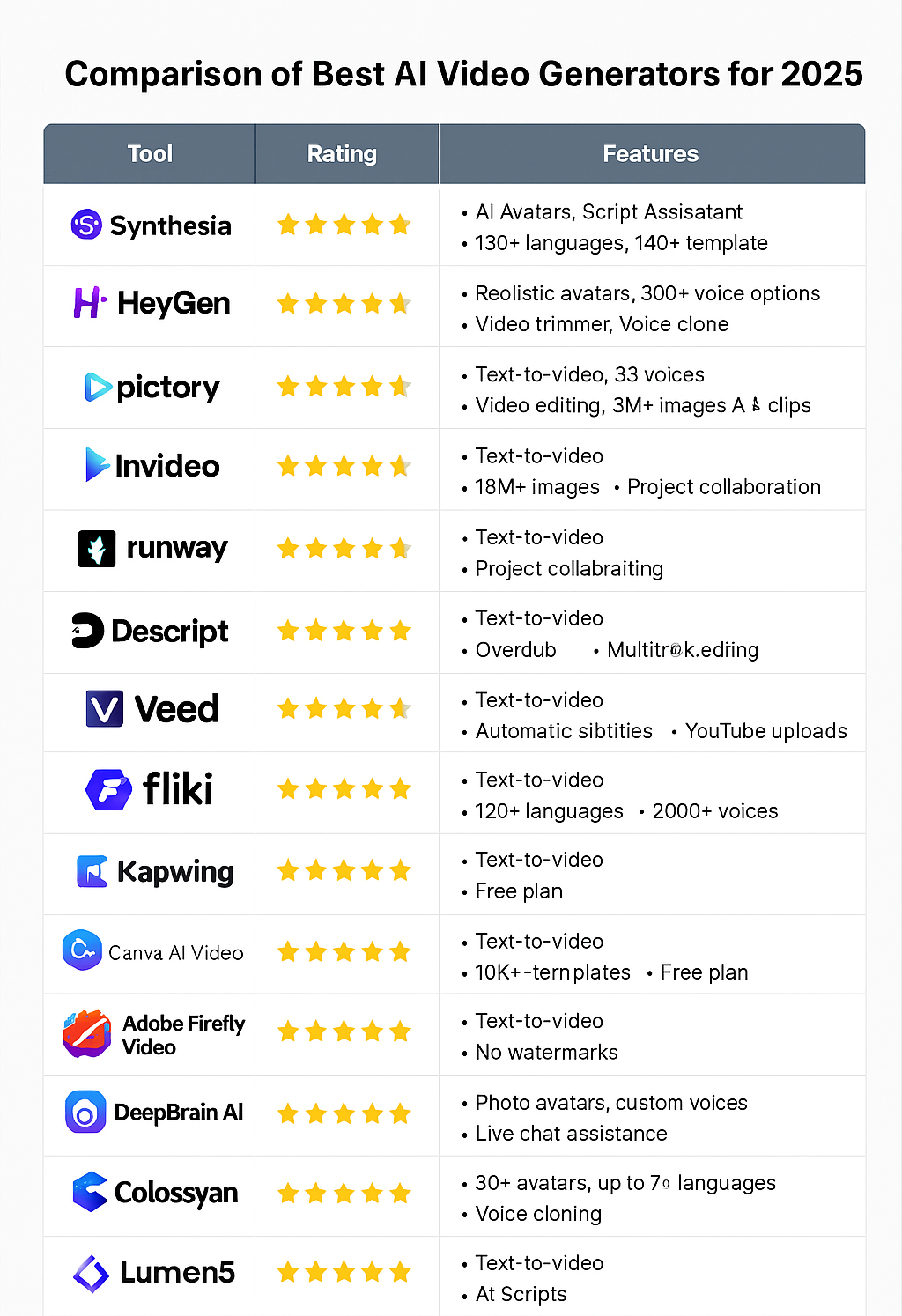
15 Best AI Video Generators for 2025
The best tools in 2025 consumed by marketers, creators, agencies, and brands include:
1.Synthesia
- Overview: It is one of the most famous AI avatar video generators.
- Best Features: Naturalistic avatars, good voice recognition, and script-to-video.
- Use cases: training videos, tutorials, and business explainers.
- Pricing: Starts at $22 per month.
- Reason why it is unique: best avatar quality.
2.HeyGen
- Overview: The animation of faces and avatars is realistic.
- Best Features: face swap, video translation, digital presenters.
- Use cases: social advertisements, social influencers, and branded videos.
- Pricing: $29/month.
- Reason why it is unique: natural facial expressions.
3.Pictory
- Overview: Short video creation is a method for transforming long texts or blog posts into short videos.
- Best Features: auto captions, summary tool, and templates.
- Use cases: shorts, content repurposing, and reels.
- Pricing: $23/month.
- Why It Is Unique: Best for transforming written content into videos.
4.InVideo
- Overview: Easy script-to-video tool.
- Best Features: Templates, voiceovers, and stock footage.
- Use Cases: Advertisements, internal videos, advertisements.
- Pricing: $25 per month.
- Why It Is Unique: Very easy to use.
5. Runway
- Overview: Advanced AI video creator.
- Best Features: Text-to-video editing and motion tools.
- Use cases: creative projects, advertisements, and short films.
- Pricing: From $15 per month.
- Why It Is Unique: The quality of high-level AI animation.
6. Descript
- Overview: Allows you to edit videos by being able to edit the text.
- Best Features: Voice cloning, power timeline, and captions.
- Use cases: podcasts, tutorials, and business content.
- Pricing: $12/month.
- Why It Is Unique: The simplest form of editing.
7. VEED.io
- Overview: Rapid artificial intelligence online editor.
- Best features: subtitles, templates, brand kit.
- Use cases: videos, scenes, and advertisements.
- Pricing: $18/month.
- Why It Is Unique: Quick and easy.
8. Fliki
- Overview: Transforms scripts into videos with excellent voiceovers.
- Best features: voiceovers, stock pictures, and music.
- Use cases: social media, reels, and explainer clips.
- Pricing: $21/month.
- Why It Is Unique: A quality voice library.
9. Kapwing
- Overview: AI video editor (spreadsheet version).
- Best Features: Clean layout, templates, and subtitles.
- Use Cases: Videos and social content marketing.
- Pricing: $16/month.
- Why It Is Unique: Extremely easy to use.
10. Canva AI Video
- Overview: Built into the design platform of Canva.
- Best features: effects, templates, and drag-and-drop editing.
- Use cases: business video, advertisement, and presentation.
- Pricing: Free + Pro plan.
- Why It Is Unique: Ideal for non-editors.
11. Adobe Firefly Video
- Overview: Adobe Creative Video Artificial Intelligence.
- Best Features: Advanced effects and editing.
- Use Cases: Videos on YouTube, professional images.
- Pricing: Part of Adobe's plans.
- Why It Is Unique: high-quality video.
12. DeepBrain AI
- Overview: Dwells on real-life online speakers.
- Best Features: Studio-like avatars, multilingual support.
- Use cases: company videos, training.
- Pricing: From $30 per month.
- Why It Is Unique: A majority of business avatars are realistic.
13.Colossyan
- Overview: Rapid script-to-video system and avatars.
- Best Features: Voice Control and easy editing of scenes.
- Use Cases: The video lessons and tutorials.
- Pricing: $28/month.
- Why It Is Unique: Rapid rendering.
14.Lumen5
- Overview: Useful for posting blogs in the form of videos.
- Best Features: drag-and-drop builder, templates.
- Use Cases: Brand and agency social information.
- Pricing: $19/month.
- Why It Is Unique: Best in the marketing team.
15.ReelsAI
- Overview: Created to be used on trending reels and TikTok-like videos.
- Best Features: Trend templates, captions, and transitions.
- Use Cases: Creators and influencers on social media.
- Pricing: $15/month.
- Why It Is Unique: It produces content that is as viral as possible in a short time.
Advantages of AI video tools in marketing.
Marketing is made simpler and quicker with AI video generators and tools. These tools help teams generate more content at a lower cost and with less effort.
Key benefits include:
- Create videos quickly.
- Save money on production.
- Be consistent with your branding.
- Increase interactions on social sites.
- Get natural voiceovers.
- Make more videos in less time.
- Improve the overall workflow.
FAQs
What is an AI video generator?
An AI video generator is a program that is used to construct videos on the basis of artificial intelligence. All you have to do is add text, pictures, or a script. The application works with scenes, voices, and the final video.
Which AI video generator is best for beginners?
InVideo, VEED. io, Canva AI Video, and Fliki are the simplest tools that a beginner can use. These AI video generators include templates and easy controls. Also, anyone can make videos without any experience with these tools.
How much do AI video tools cost?
Prices are normally determined between $10 and $40 per month. There are those that have free plans with restricted features, and then there are higher plans that have more exports and quality.
Which AI video creator fits YouTube?
The top choices for YouTube are Runway, Pictory, Descript, and Adobe Firefly. They work well with long videos, subtitles, and HD exporting.
Are AI avatars realistic enough for brand videos?
Yes. Synthesia, HeyGen, and DeepBrain AI offer realistic avatars for business and marketing.
Which AI tool works best for ad creatives?
Canva, InVideo, VEED. io, and Runway are the best AI tools for ads, as they offer templates and quick editing capabilities.
Conclusion
By 2025, AI video generators will be a potent instrument for marketers and creators. They assist you in creating videos at a lower cost, faster, and more professionally. Whatever you make—ads, tutorials, reels, or videos on YouTube—there is a tool that will meet your needs.
Need to enhance your video content? Choose the right AI video generator and start making smarter and even faster decisions—with Digiexpo by your side along the way.